Preview the Running App Before You Merge
The only live preview that works across multiple repositories. See your frontend, backend, and infra changes running together — in one session, in your browser, before a single line hits main.
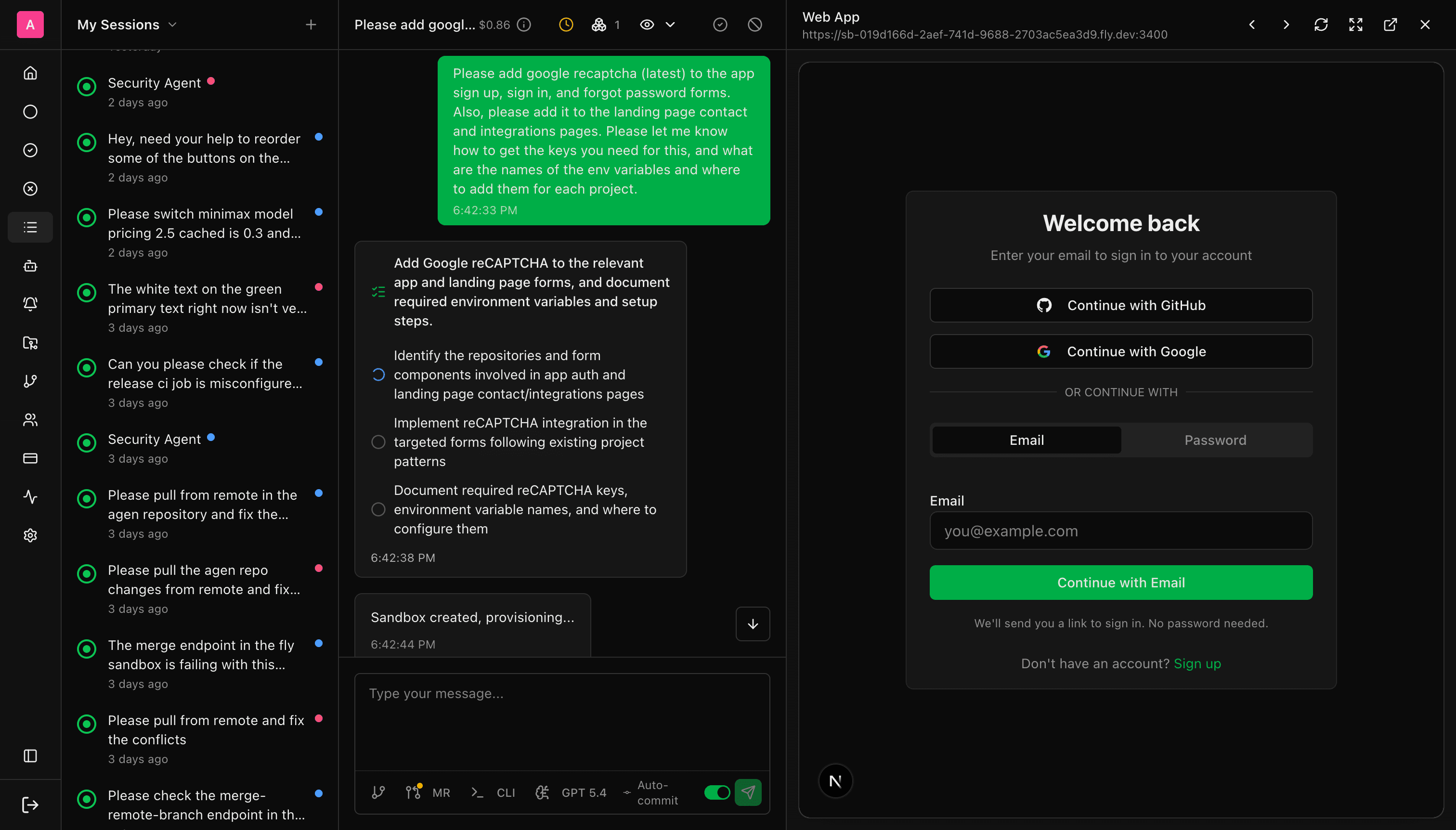
Code Diffs Don't Show You If the Button Works
You've seen it before. An AI tool writes code, shows you a diff, and you merge it hoping everything works. Then you deploy, open the app, and something's broken — the layout is wrong, the button doesn't work, the API call fails silently.
Diffs tell you what changed. They don't tell you if it works.
You shouldn't have to deploy to staging, spin up a local dev server, or install Docker just to see what an AI agent built. You should see the running app before you make any decision.
From Task to Running App in Four Steps
Agen turns a plain-English task into a running app you can click through, one step at a time.
You assign a task
Describe what you need in plain English. “Add a settings page with Stripe billing.”
The agent builds it
The agent clones your repo, writes the code, installs dependencies, and starts the application in an isolated cloud sandbox.
The preview loads automatically
A live, in-browser preview of the running application appears in your session. No setup on your end — it just works. Click through it, test interactions, verify the UI.
You decide
If it looks right, review the diff and merge the PR. If something's off, tell the agent what to fix — it iterates and the preview updates.
One Session. Multiple Repos. One Live Preview.
This is what no other tool can do. When your agent makes changes across your frontend, backend, and infrastructure repos in the same session, the preview shows all of those services running together. Not three separate previews — one integrated preview of the full stack.
One task can update your frontend, backend, and infra — and the preview shows the whole thing running together.
You ask the agent to “add Stripe billing to the settings page.” The agent updates the API in your backend repo, adds the UI in your frontend repo, and updates the environment config in your infra repo. The preview shows the entire billing flow working end-to-end — the settings page calling the API, the API processing the request, the webhook handling the response. All from one task.
Zero Local Setup
No IDE. No terminal. No Docker. No `npm install`. No dev server. The preview runs in the cloud and opens in your browser on any device.
Built Into Every Session
Previews aren't an extra workflow. Every agent session produces one automatically, so seeing the running app is part of review by default.
Actually Interactive
It is the running application itself. Click buttons, fill forms, navigate flows, and verify real behavior before anything gets merged.
In the real world, features span repos. A preview that only shows one repo's changes is like testing the frontend without the backend running. Cross-Repository Live Previews show you the actual integrated result — the same thing your users will experience in production.
Nobody Else Does This the Same Way
The Agen difference: Cursor and Devin both have live previews. The difference is Cross-Repository Previews. When your agent makes changes to your frontend, backend, and infra in the same session, you preview the integrated result — all the services running together. Every other tool previews one repo at a time.
When Previews Change Everything
UI Changes
Agent adds a new page, updates styling, or builds a component. You see the actual rendered UI — not just the JSX/HTML diff. Catch layout issues, responsive problems, and visual bugs before they hit production.
API Integrations
Agent adds a Stripe checkout, OAuth flow, or third-party API. The preview runs the actual flow end-to-end. Verify the integration works before merging.
Bug Fixes
Agent fixes a bug. The preview shows the fix in action — the error is gone, the feature works. Confidence to merge without “let me test this locally first.”
Non-Technical Review
Share the preview URL with your PM, designer, or founder. They see the running app and approve the change — without cloning a repo or understanding code.
See It Running Before You Merge
Every session. Every change. Zero setup.
$20 free credits · No credit card · No setup